A Clavus interface, an OpenClaw brain

Your AI,
always with you.

Not an app you open. An assistant who's already up to speed, and who keeps working when you step away. Plan a trip, sort out dinner, talk through an idea, prep for tomorrow, hand off a job and get it back done. It sees the screen when you dictate, finds the source note behind an answer, and follows you from Mac to iPhone.

Read the story
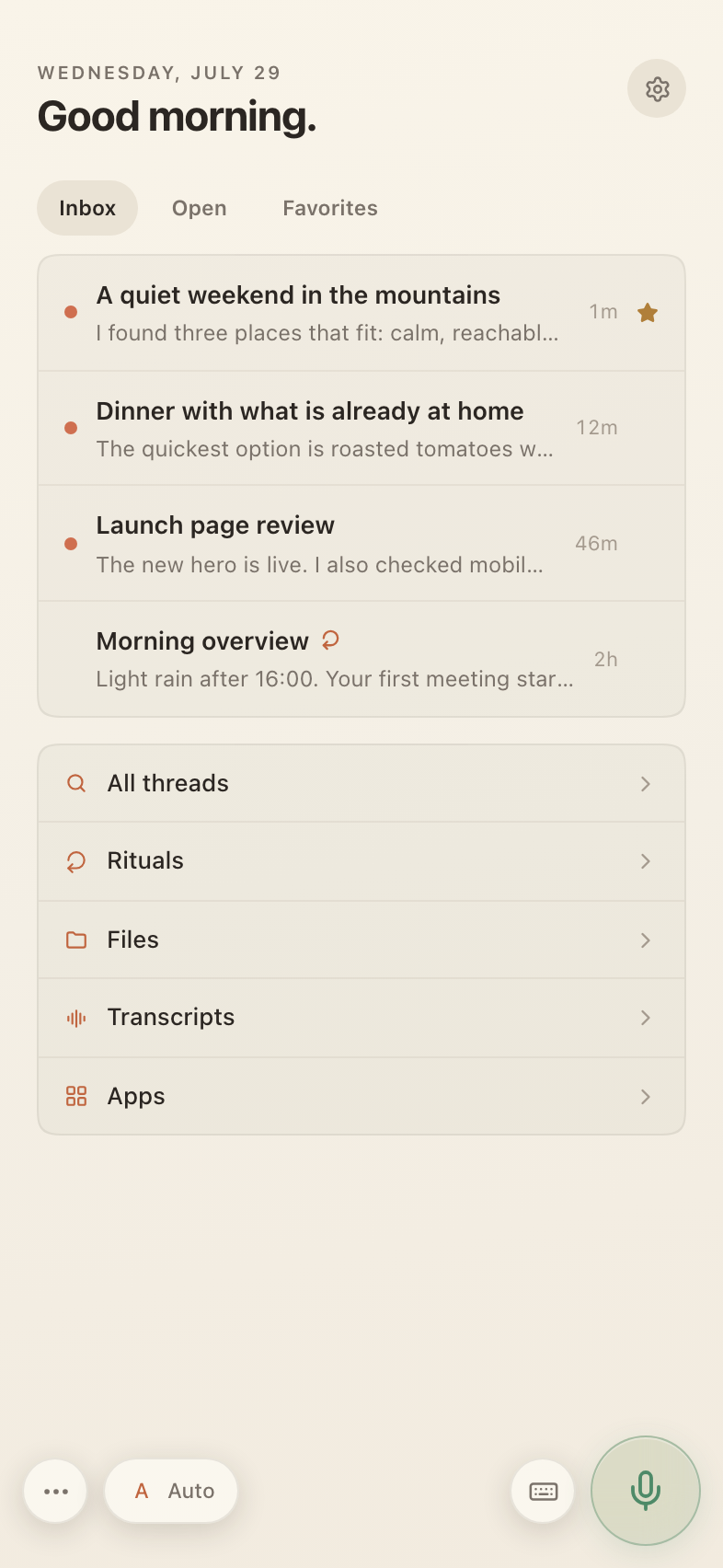
Clavus home showing active conversations, rituals, files and apps

The idea

Not an app.
An assistant.

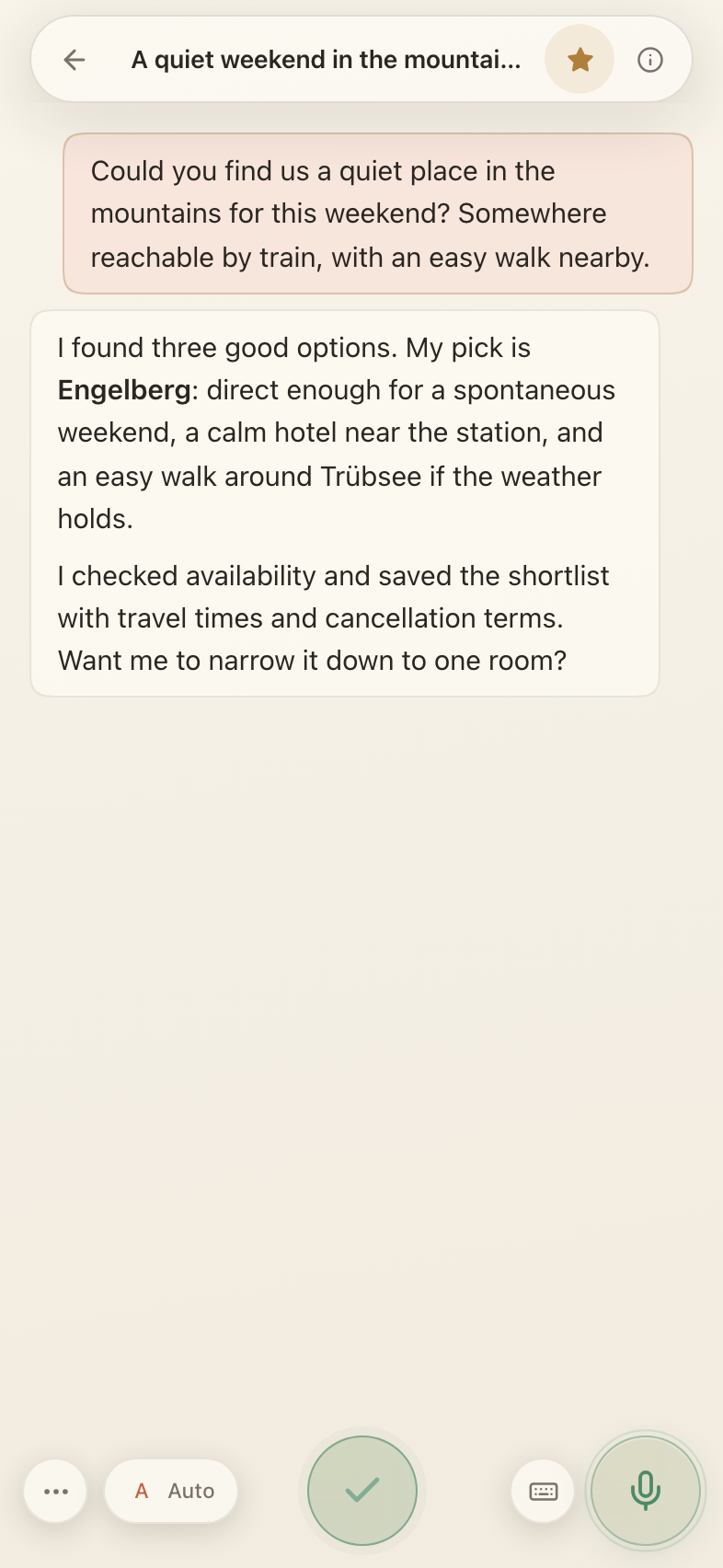
Most AI is a tab you open when you need it. Cold, context-free, asking you to re-explain yourself every morning. Clavus is the opposite. It lives where you live, knows what you're working on, and replies the way a person would. It can take a job and run with it, come back when it has something, and get a little better every time.

You explain yourself once, and more of the day just gets done.
A real Clavus conversation using a safe demo itinerary

It knows you

Teach it once.
It remembers for good.

It starts by getting to know you: your name, language, keyboard, and even what you call your assistant. Tell it once how future dictation should sound, how lightly it should correct you, or which AI should handle a kind of task, and that rule carries forward too. Every conversation builds on the last: your music taste, where you like to travel, the half-finished idea from Tuesday. Clavus shapes itself around your life, so you never start from zero.

Music tasteTravel styleHow you write

Your notes stay yours

Open by design.
Useful everywhere.

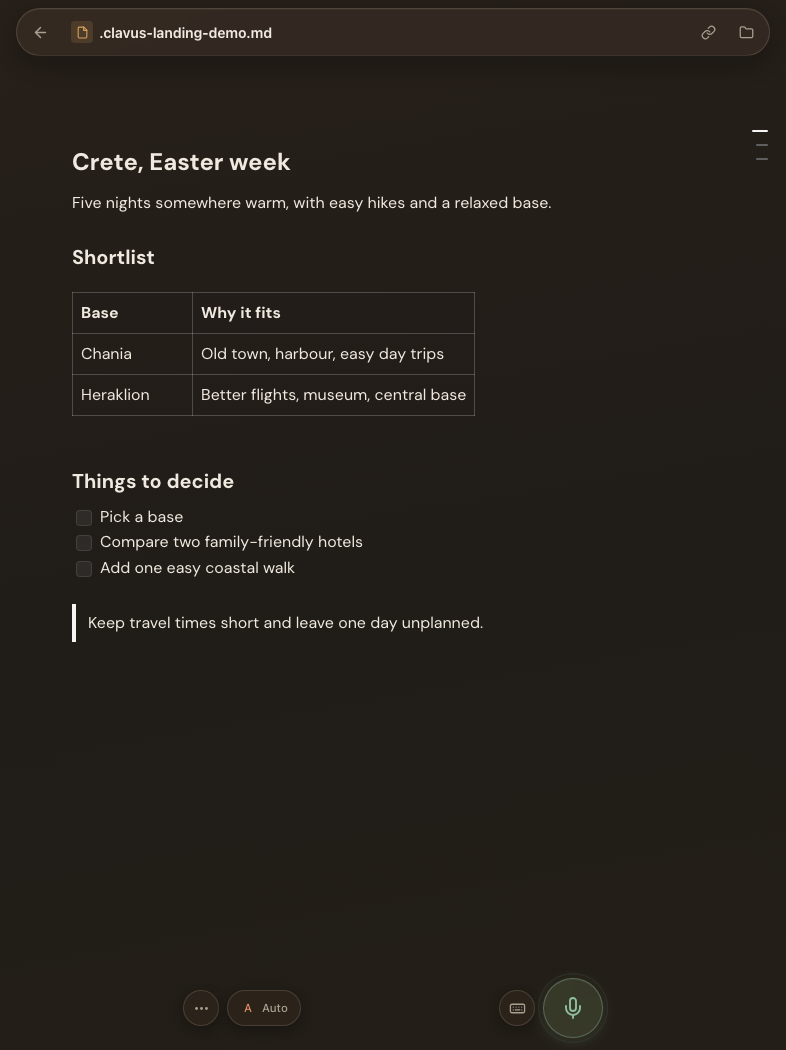
Notes, plans, and Ritual instructions stay as ordinary files in your workspace. Keep a linked Markdown document open beside its Thread and it becomes the work at hand: talk through it, point to the words you mean while you speak, or dictate and send one section while the recording keeps running. Clavus carries those exact references into the conversation and can edit the document in place, with every AI change highlighted for you to keep or undo.

Work in the margins together too: leave a comment on an exact passage, reply or resolve it beside the document, dictate your response, or @ another note. Clavus can make a requested change and answer in that same comment thread. Comments sync across Clavus instances without altering the Markdown itself; files stay readable offline, and version history lets you browse and restore what came before.

The real Clavus Markdown editor with a safe demo travel note
Plain MarkdownPassage commentsReview AI changesDictate in sectionsWorks offlineSyncs safelyVersion history
Da Angelo · Zürich
★ 4.6 · Italian
J
"Is this place any good for Friday?"
That's the place Marco recommended, it's on your saved list. Booked out Friday, but Saturday's open. Want me to grab a table?

It sees what you're doing

Talk about what's
on your screen.

Dictate while you work and Clavus sees what you see. The page you're on, the window you clicked, the field you're writing in, even the text you've selected when you say “make this friendlier.” On Mac or with the iPhone keyboard, you can change just that selection or ask Jane to rewrite the whole field. Attach a photo or screenshot and Jane can zoom in to inspect details a thumbnail would miss. No pasting context, no re-explaining what "this" is. Less a tool, more someone sitting next to you.

Work that compounds

Rituals get better every round.

Turn recurring work into a standing practice that runs, learns, and improves, without building a workflow or filling out a settings screen.

Clavus home with a recurring Morning overview ritual

Configure it by chatting

Say what you want and when you want it. Your assistant creates the Ritual, connects the right files, and keeps its instruction as editable Markdown. Clavus reads that instruction to choose the right connected model for each round—and honors a model you name there.

Every run is a round

Each round has its own outcome, sources, and conversation—and stays in the Ritual's language even when its inputs do not. Review it, steer it, or let the next one run quietly in the background.

It reviews how you work

The built-in Weekly retro looks across conversations, Rituals, and agent sessions for recurring friction, model or keyboard misses, and features that could help. It brings back a short, evidence-based set of improvements for you to choose—not a silent settings change.

Start it from anywhere

Give a Ritual its own trigger link and another app can start a round with fresh input. An order, form, or automation becomes work Clavus can understand and carry forward.

It works on its own

Hand off a Thread.
Get back something done.

Some Threads you think through together. Others just need doing. Clavus takes one, breaks it into smaller tasks, works on them independently, and brings the pieces back.

Follow along while it goes, or use Send now to add direction while Jane, Claude Code, or Codex works. Clavus can fold your message into the running turn without stopping it. It decides when there's enough to show, so you're neither spammed nor left in the dark.

When the work moves into a browser, a live view stays right in the Thread. Watch the page change as Clavus works, open it beside the conversation on your Mac or full-screen on your iPhone, then fold it away when the run is done.

When the job belongs in code, your assistant can open a Claude Code, Codex, or optional DeepSeek Harness session with the project and relevant screenshots attached, then put that session on Home for you to review or continue. If the result misses the mark, tell your assistant what to change: it sends the feedback into the same session and brings the revised work back.

Weekend in Tuscany

running

Checked flights and trains from Zurich

Comparing three family-friendly towns

Next: shortlist hotels, rough out a budget

trenitalia.comLive

Zurich → Florence

Saturday, October 3

3 options
Clavus: One option already looks great. Want it now or when I've compared all three?
4 steps
Searching workspace2
Trip notes and saved places
Running command2
Finding Markdown notes
infind Workspace -name "*.md"
out3 notes matched

Create the trip folder

Save the shortlist beside your existing notes.

◇Files changedYes
◇Data sentNo
mkdir -p Workspace/Trips/Tuscany
DenyAllow once⌄

It stays accountable

See every step.
Approve what matters.

When Clavus uses tools, the work stays attached to its answer. Open the action trail to see what it searched, sent, or got back, and copy any input or result when you need the raw detail.

If a command could change files or send data, Clavus pauses right in the Thread. You see the purpose, the system-checked impact, and the exact command before you allow it once, trust that exact action in future, or deny it.

If something breaks, report it from the conversation and Clavus opens a dedicated support Thread. The report travels through an encrypted case channel; diagnostic questions are handled read-only on your machine, and anything personal waits for you to review, edit, send, or decline. You can end that permission at any time.

It thinks at the right speed

Thorough when it must.
Quick when it can.

Easy question, instant answer. Hard one, it takes a beat to really think. Leave it on Auto, or choose the model, reasoning depth, and engine yourself when the work calls for it.

Fast

· GPT-6 Luna
low

"Translate ‘thank you’ into Italian."

Grazie.

Routine

· GPT-6.1 Sol
low

"How's the weather today?"

Sunny, 18°. Light jacket weather.

Substantive

· GPT-6 Astra
high

"Let's plan next year's big trip."

weighing three regions

A useful answer

interactive
MonTueWedThuFri

Which route should I book?

Start a packing-list Thread
A focused conversation, ready with the trip detailsStart thread

It answers with more than text

See it. Compare it.
Choose right there.

When a paragraph isn't the best answer, Clavus can build an interactive chart, a focused question, a set of comparison cards, or a ready-to-start Thread directly in the conversation.

Explore a chart full-screen, compare routes or products, send your choice, or spin one topic into a focused conversation with its first message already prepared. Nothing happens until you choose it.

Same conversation, everywhere

iPhone

Action Button, Dynamic Island, and keyboard

MacBook

overlay, dictation, context, and Notes sidepanel

Browser, anywhere

workspace, live Voice, source links

built for your voice

It's always with you

On every device.
In every moment.

Pick up on your phone what you started on your Mac. Start a new conversation or dictate from the Home Screen, Control Center, Shortcuts, or the Action Button. On supported iPhones, the recording stays in the Dynamic Island while you speak; Clavus opens when you stop and routes your words to the matching Thread, a new one, or the conversation picker. When you're already writing, use the familiar grid keyboard or Clavus's compact hex layout—with QWERTZ, QWERTY, and AZERTY available. It can correct the field, suggest the emoji you mean, learn your own names and vocabulary, and quietly adapt to where your thumbs actually land.

When you want a real back-and-forth, switch that same Thread to Voice. Your assistant can look through your files, use its tools, and keep every spoken turn in the conversation, not in a separate voice app you lose when the call ends.

On the Mac, summon Clavus as an overlay over whatever you're doing. Dictate into the focused field, add your screen as context, or bring in the Notes sidepanel from the screen edge with ⌥Space. Everything stays in sync with the main window.

Search across everything

"Did we write
anything about this?"

Search filenames or what is inside your workspace, use @ to bring a file into a Thread, or just ask the half-remembered question. Clavus surfaces the right note even when your wording does not match it exactly.

Clavus can also pull matching notes into context automatically, then show you the sources it used. Workspace and Notion results appear as chips you can open, not mystery context hidden in a prompt.

that ramen place Marco mentioned

Zürich food spots to try

Workspace source · edited 6 days ago

List

Chat · "ramen place Marco recommended"

Conversation · last week

Notion · restaurants & travel

Notion source · jump to page

Search contentsAdd with @Automatic contextOpen the source

What you'll actually ask

Life, work, everything in between.

Same conversation, same memory, completely different questions. Clavus moves with you through the day.

Concerts

"Any good concerts coming up?"

Two bands you like are in town next month. Want me to grab tickets?

Training

"Skipped legs yesterday, reshuffle the week?"

Done. Moved legs to Thursday, pushed cardio to Saturday.

Food

"What can I cook with what's in the fridge?"

Mushroom risotto. You have everything except parsley. Skip it.

Health

"My sleep's been off this week, why?"

Three late dinners and two espressos past 4pm. Pattern's pretty clear.

Travel

"Long weekend in May, somewhere warm?"

Crete or Sicily, both under two hours from Zurich. Want me to draft an itinerary?

Going out

"Find us a good dinner spot for tonight?"

Three near you with a free table at 7:30, all your kind of place. Want me to book one?

More than software

An assistant, a mentor,
a coach, and a friend.

Always there. Already up to speed. The kind of intelligence that can help with the work, challenge your thinking, and still know when you simply need to talk.

Powered by OpenClaw

Clavus is the interface.
OpenClaw is the brain.

OpenClaw is the engine that remembers, routes, and reasons. Clavus is the part you actually touch. Together they can pick the right model for every thought, or leave that choice to you. Add and manage tool integrations in Clavus Settings, with their connection state in one place.

When a task needs an API key, Clavus gives you a masked field right in the conversation. Choose which sites may receive it, then save it to the protected store without putting it in the chat history.

Works with

CClaude Opus 5.5
GGPT-6.1 Sol
FFable 5.1
GGemini 4
OROpenRouter
and many more

Easy from the first hello

Ready in minutes.
Yours from day one.

Hosted Clavus is ready to go. A short conversation sets up your name, language, and working style, then opens a “Make it yours” Thread. Rename your assistant, choose a face, orb, blob, or no picture at all, and try colors and wallpapers made for you — including a picture you create together. Every choice applies immediately across your devices. No terminal, SSH, or configuration maze.

Prefer to run it yourself? Connect Clavus to your own OpenClaw gateway and keep your Threads and files on infrastructure you control. The Mac and iPhone apps follow the server you choose without a custom build.

Ready in minutesYour name & voiceYour look, colors & wallpaperHosted or self-hosted
My look
Face
Orb✓
Blob
Colors
Wallpaper
Your picture

Hi Sam. Let's make Clavus feel like yours. Everything here applies right away, on all your devices, and you can come back to this conversation whenever you like.

My name. I go by Miko right now. If something else feels more like me to you, just say so.

My look. Pick whatever feels right. We can tweak it afterwards, right here.

My wallpaper. Keep the colors and try an illustration, or ask me to make one for you.

Reply to Miko…↑